
How do I update my profile?
If you were a migrated member or added as a new member by admin, you bypassed the sign up process. In order to maximize your membership, we recommend updating your profile so we have the information you would have filled out upon sign up.
Here's how to do that:
- Login to the website
- Navigate to the Member Dashboard
-
To get here on desktop, hover over MEMBERSHIP in the top navigation header

- If on mobile, you can open the hamburger menu (3 lines) in the top right of the website and it will appear under the MEMBERSHIP section.
-
-
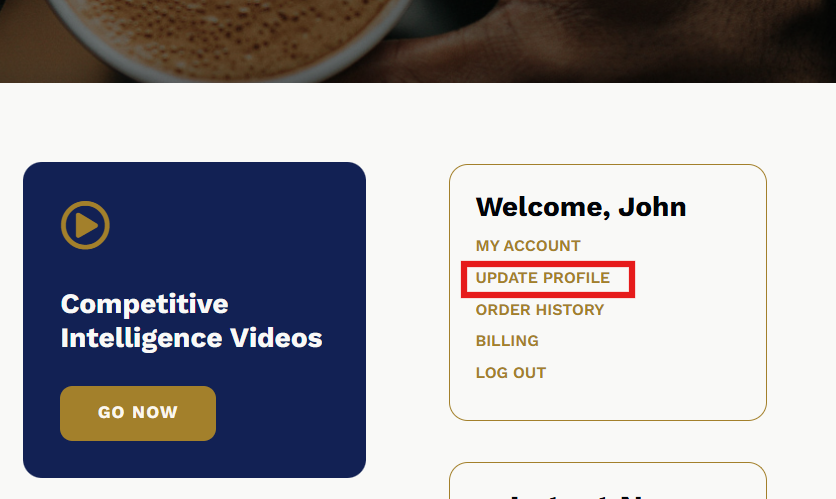
Then from the dashboard, you will see a box on the page that says "Welcome, [your first name]" with your account options. Click Update Profile:
- From the update profile page, you should fill in any of the missing fields. It will ask you for:
- Account Info (this info should already be filled in)
- First and Last Name
- Display name
- General Info
- Agency Name (if applicable)
- Affiliated Insurance Company
- Birth Date
- Mailed publication opt in or out
- Communications
- Cell Phone
- SMS notification opt in or out
- Office Phone
- Secondary Email Address
- Select what type of member-only emails you would like to receive:
- Weekly Newsletter
- Event Announcements & Reminders
- New Content Available
- Mailing Address
- Account Info (this info should already be filled in)
- Be sure to save and hit Update Profile

You can come back here at any time to update preferences and info as it may change.